Outcome
Give each eligible pull request an isolated copy of the application at its own URL, update it when the pull request changes, and tear it down when the pull request closes.Prerequisites
- A GitHub repository connected to Stackdome through a GitHub App installation for automatic pull-request events. Public repository URLs support manual previews only.
- A
stackfile.yamlcommitted on the pull request branch and validated with the current CLI. - Enough destination capacity for one full copy of the declared stack per active preview.
- Access to enable the repository in the dashboard or API. The current public CLI has no preview-configuration, sync, list, or delete commands.
Agent prompt
Agent actions
1
Inspect the repository
Read the Dockerfile, Compose file, runtime configuration, public ports, environment requirements, dependencies, and persistent-data paths. A preview deploys the whole Stackfile, not only the changed service.
2
Prepare the Stackfile
Run
stackdome init when the repository has no Stackfile, then edit the generated file from repository evidence. Ensure at least one HTTP port is public when the preview needs a URL.3
Validate and commit
Run
stackdome validate --file stackfile.yaml. Commit the validated Stackfile at the configured path on every branch that should preview; Stackdome reads the pull request head commit.4
Hand off dashboard-only setup
Use Platform → Previews → Enable repository and select the connected repository, base branch, Stackfile path, active-preview cap, and configuration-level environment values. The CLI cannot perform this step.
5
Verify an actual pull request
Open or synchronize an eligible pull request, wait for the environment to become Ready, and test the URL from its sticky pull-request comment or dashboard card. Do not treat a successful local Stackfile validation as a running preview.
Success criteria
stackdome validate --file stackfile.yamlexits successfully for the file committed at the configured path.- The preview configuration targets the intended connected repository and base branch, with an active-preview cap that fits available capacity.
- An eligible pull request reaches Ready and reports the deployed head commit.
- At least one public resource URL is present in the pull-request comment or dashboard card, and
curl --head --max-time 15 <preview-url>reaches it. - Closing the pull request starts teardown and the preview is eventually marked deleted; no documentation or automation assumes a timer-based expiry.
CLI and Stackfile boundary
The CLI can initialize and validate the Stackfile used by previews. It cannot enable a repository, inspect preview status, sync a preview, or delete a preview configuration.branch above remains the ordinary-stack revision policy; it does not cause the preview to deploy main instead of the pull request.
Dashboard workflow
A preview environment is a complete, throwaway copy of a stack, deployed from a pull request branch, reachable at its own URL, and torn down when the pull request closes. Stackdome calls the feature Previews, in the sidebar under Platform.You do not point Previews at an existing stack. You point it at a repository, and the stack comes from a stackfile committed in that repository. Every pull request against that repository’s base branch then gets its own stack, built from the stackfile at that pull request’s head commit.Dashboard prerequisites
- A connected git provider. Previews are driven by GitHub webhook deliveries, so the repository must be reachable through a GitHub App installation you connected under Git Providers. See Deploy from git. The repository picker also accepts a plain public URL, but a public URL only supports environments you create by hand — pull request automation needs a connected provider.
- A stackfile in the repository. This is the template for the environment: it defines the whole stack — every resource, its source, its ports, its environment. See Write the stackfile below.
- A cluster with room to run it. Each open pull request runs a full copy of the stack. Read Capacity before you enable a busy repository.
Write the stackfile
The stackfile is the one thing you have to author yourself. Commit it at the path you give the configuration — by defaultstackfile.yaml at the repository root — and keep it on the branches you want previewed, because Stackdome reads it at the pull request’s head commit, not from your base branch.The smallest stackfile that works names the stack, declares one resource, gives that resource a source, and exposes one port:nameand at least one entry underresourcesare required.- Each resource needs exactly one source —
build, to build from git, orimage, to run a prebuilt one. Never both. - A
buildneedsrepo.branchandtagare mutually exclusive;commitis an optional pin and requires one of them. Setting no revision fields uses the repository’s default branch. - Each port needs a
nameand a valid port number.public: trueis what earns it a URL; a port without it stays internal to the stack.
build.repo matches the configuration’s repository, pinning it to the pull request’s head commit. So branch: main above does not mean previews build main — it is only what that resource does outside a preview.This is a minimal example, not a reference. See the Stackfile reference for the fields accepted by the installed release and validate every change with
stackdome validate.Enable a repository
Previews lists the repositories you have configured, each with its base branch and how many environments are currently live.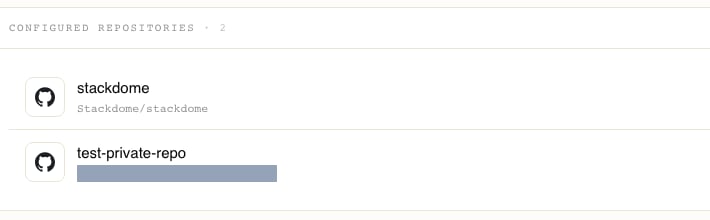
1
Open the wizard
Click Enable repository.
2
Pick the repository
The first step is a repository picker with two tabs, Connected provider and Public URL. Choose the repository from your connected provider, then click Continue.
3
Fill in the configuration
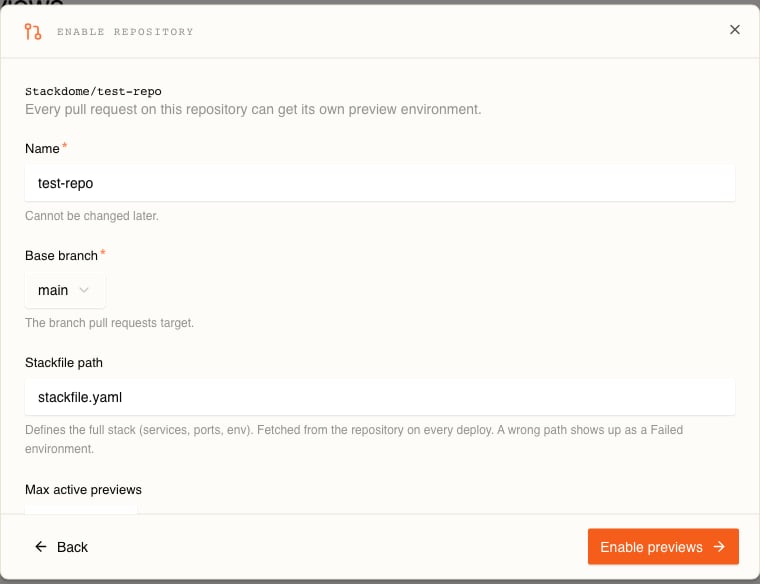
4
Save
Click Enable previews. The repository now appears in the Previews list, and the next pull request event on it will create an environment.
Environment variables
Two layers of environment variables land on top of what the stackfile itself declares, in this order:.env.preview— an optional dotenv file at the repository root, read at the pull request’s head commit. A missing or unreadable file is simply skipped.- The configuration’s Environment variables — the ones you entered in the wizard. These win over
.env.preview.
What happens on a pull request
Stackdome processes exactly two GitHub event types:installation and pull_request. push deliveries are accepted and dropped. Within pull_request, these are the actions that do something:Any other
pull_request action — labelled, assigned, edited, review requested — is ignored.A delivery is also dropped, deliberately and without error, when:- The head branch lives in a fork. Fork pull requests carry untrusted code and are never built.
- The pull request’s base branch is not the configuration’s base branch.
- No preview configuration matches the repository.
- The action is
closedbut there is no environment to remove.
Every delivery is logged with its outcome, including the drops, so a preview that never appears is diagnosable from the API server log.
Where the preview URL appears
In the dashboard
Open the configuration from Previews. Each environment is a card showing the pull request number, the branch, the short commit, a status word — Ready, Pending, or Failed — and, once it is live, a chip per publicly exposed resource that links straight to its URL. A resource with no publicly exposed port gets no chip, so a card can be Ready with nothing to click. Search filters by pull request number, branch, or commit; the Status and Sort controls narrow and reorder the grid.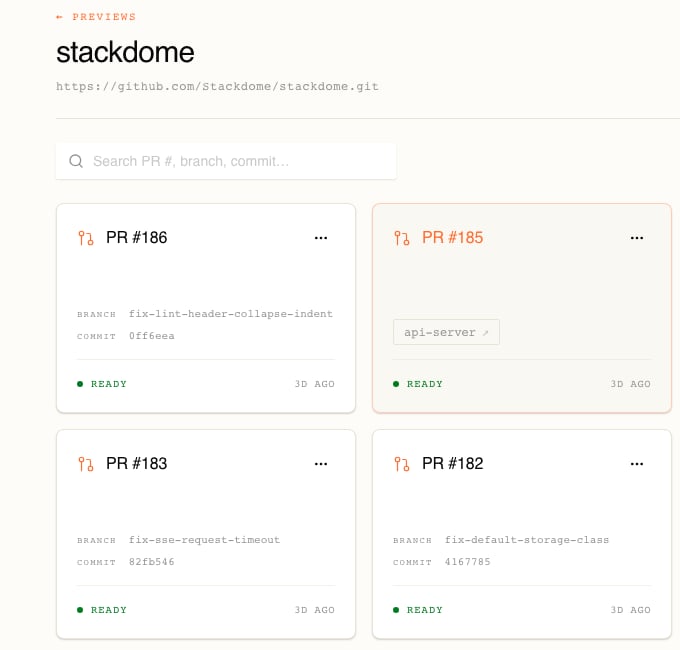
pr-<number>- prefix on its subdomain, so pull request 185’s URL is distinct from pull request 186’s and from your production stack’s. See Domains and TLS for how the rest of the hostname is put together.In the pull request
Stackdome also posts the environment’s state back to the pull request as a single sticky comment, created the first time the environment reports in and edited in place after that. It carries:- A heading for the current state — live, deploy failed, or deleted.
- The failure message, when the deploy failed.
- The deployed commit.
- A table of resources and their URLs.
Lifecycle and cleanup
An environment moves through Provisioning → Deploying → Ready, or lands in Failed. A teardown puts it in Deleting.Three things end an environment:- The pull request closes — merged or not. The
closedevent starts the teardown. - You delete it — the ··· menu on the card, then Delete.
- You delete the whole configuration — but only after its environments are gone. Stackdome refuses otherwise and tells you to delete the environments first.
Creating one by hand
You can also create an environment without a pull request event, which is the way to test a configuration before wiring anything up. On the configuration’s page, click New preview environment:Then click Create environment. A manual environment does not follow new commits on its own — use Sync from the card’s ··· menu to move it to the branch’s latest commit.
Capacity
Related tasks
Deploy from git
Connect a repository and verify its ordinary deployment workflow.
Stackfile reference
Check the fields and current validator behavior used by previews.