Outcome
Deploy an existing container image as a Stackdome resource and wait until the release is healthy. This path pulls an image that was built elsewhere; it does not clone a repository or run an image build. A public port produces a URL you can return to the user.Prerequisites
- The image reference, including its registry host and a tag or digest. Prefer a digest when the deployed bits must not drift.
- Evidence about the container’s listening ports, command, environment requirements, dependencies, and storage paths.
- The URL of Stackdome Cloud or a self-hosted installation, plus an API token. See authentication and API tokens.
- A registry reachable from both the Stackdome hub, which probes the image before release, and the deployment destination, which performs the pull.
- For a private image, a registry credential already configured through the dashboard or API. The current public CLI cannot create, update, or verify registry credentials.
postgres:16 as an ordinary resource.
Agent prompt
Agent actions
1
Inspect the runtime requirements
Confirm the exact image reference, listening ports, command, environment values, dependencies, and storage. Do not assume that a container exposes a public HTTP port.
2
Initialize the Stackfile
Run
stackdome init before editing. It creates stackfile.yaml or converts a supported Compose file in the current directory.3
Set the image source
Edit the generated resource so
image contains the full reference. Remove any build key from that resource because a resource accepts exactly one source. Add only the ports and runtime configuration supported by evidence.4
Validate and authenticate
Run
stackdome validate, then authenticate with stackdome login --url https://<your-stackdome-host> --token <api-token> and confirm the active scope with stackdome whoami -o json.5
Deploy and verify
Run
stackdome deploy --wait -o json, retain its non-empty release.id as the deployed release ID, then run stackdome status -o json. For a public service, run stackdome open -o json and return an entry from urls.Success criteria
stackdome validateexits successfully for the generatedstackfile.yaml.stackdome deploy --wait -o jsonexits successfully, returns a non-emptyrelease.idthat is retained as the deployed release ID, and returnsrelease.stateasReleased.stackdome status -o jsonreturnsconverged_release.idequal to the deployed release ID,converged_release.stateasReleased, andconverged_release.healthasok.- A public service returns at least one entry in the
urlsarray fromstackdome open -o json. - No registry password or token appears in the Stackfile, shell history captured for support, screenshots, tickets, or chat messages.
CLI workflow
Initialize from the working directory, then edit the generated file:ghcr.io/acme/api:1.4.2 for another registry. A resource must contain exactly one of image or build. See the Stackfile reference for runtime fields and current release gaps.
Validate, authenticate, deploy, and inspect the terminal state:
Dashboard workflow
Use the dashboard when you need to configure private-registry credentials or prefer the visual stack editor. For a complete first-deploy walkthrough, see Deploy using the dashboard.Set an image source
Open the stack, go to the Architecture tab, and click the resource’s node on the canvas to open the drawer. Everything below is in the drawer’s SOURCE section.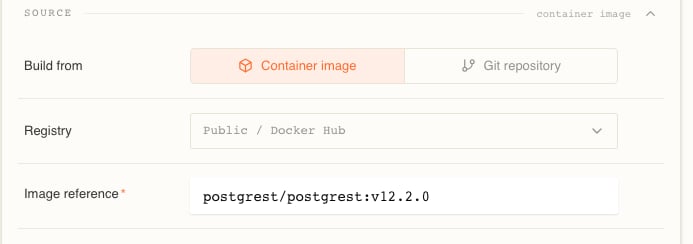
1
Set Build from to Container image
Build from is a two-way toggle — Container image or Git repository. Switching hides the other side’s fields but keeps their values, so flipping back and forth costs you nothing.
2
Choose the registry
Registry is a picker, not a text box. It reads Public / Docker Hub until you choose otherwise, and it lists every registry credential your organization has added, by host. Typing into it offers Use ”…” as registry host so you can point at a host you have no stored credential for.Picking a credential here does two things: it rewrites the host segment of the reference, and it pins that credential to this resource. See How a resource picks up a credential.
3
Enter the image reference
Image reference is required. It shows
e.g., nginx:latest, redis:7 while no host is set, and e.g., acme/api:1.4.2 once one is. When a host is in play it appears as a grey chip in front of the field, and the field itself holds only the repository and tag.4
Apply and deploy
Editing the drawer builds a draft — the footer counts your pending edits. Nothing is pulled until the draft is applied and the stack is deployed.
What the reference field accepts
A reference is a registry host, a repository path, and a tag or digest. All of these are valid:localhost. Anything else is a Docker Hub repository — which is why acme/api:1.4.2 is an account repository and not a host called acme. Paste a fully-qualified reference and the whole value is replaced, chip and all.Three host spellings mean the same registry: docker.io, index.docker.io and registry-1.docker.io are treated as one, and are stored normalized as index.docker.io.Prefer a digest when you care that a redeploy runs exactly the same bits. A tag is a pointer the publisher can move, so :1.4.2 today and :1.4.2 next month are not guaranteed to be the same image; @sha256:… cannot drift. A reference with no tag and no digest means latest, which is the least predictable choice of all.The reference is parsed when you save. An unparseable one is refused on source.image.ref with image_ref_invalid and a message naming what the parser objected to; an empty one with image_ref_required.One source per resource. A resource carries either a build source or an image source, never both — the API refuses the combination with
source_conflict: “a resource cannot have both a build source and an image source”. Leaving out both is refused too: “exactly one of a git/volume build source or an image source is required”. The Build from toggle is what keeps you on the right side of this, which is why it stashes the values from the branch you switched away from instead of sending them.Private registries
Registry credentials live under INTEGRATIONS →Image Registries in the sidebar. The page is headed Image registries — “Store registry credentials so builds can pull private images and push artifacts.”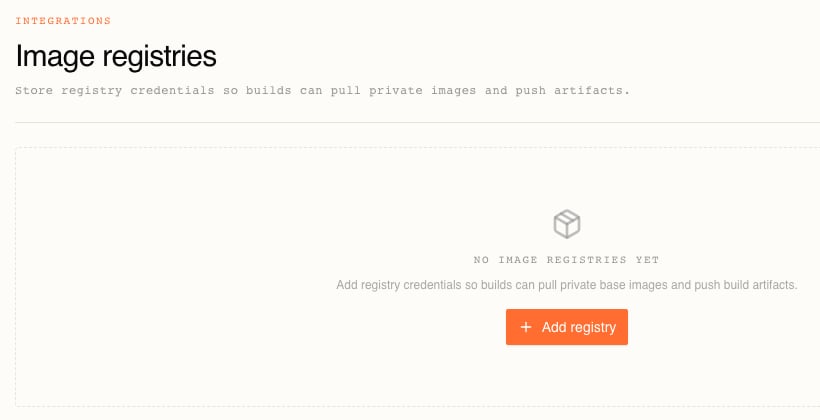
Add a credential
Choose Add registry. The dialog is two steps.The first asks “Where do your images live?” and offers five tiles: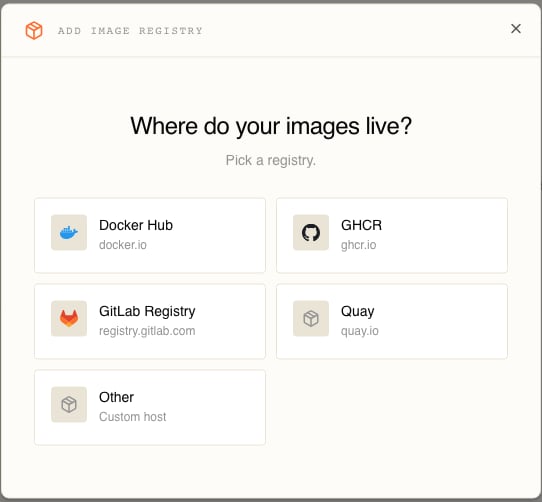
The second is the credential form, and it is explicit about what happens to what you type: “Stackdome stores the credentials encrypted and uses them only for image pulls and pushes.”
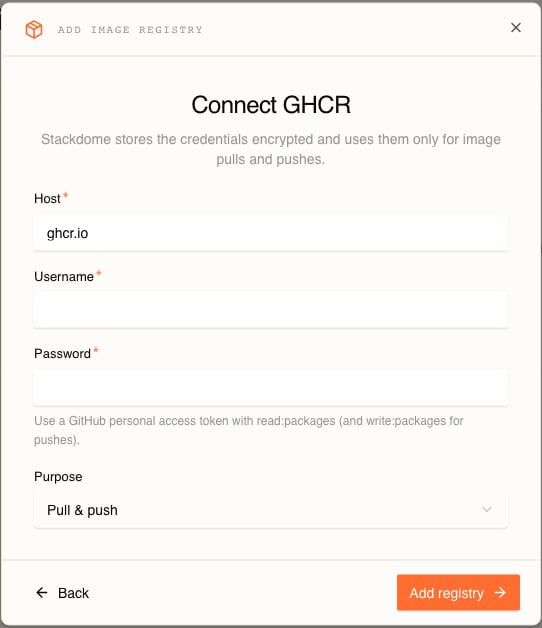
The password field is where the token goes, and each provider wants a different kind:
Two rules constrain what you can store:
- One credential per host, per purpose. A duplicate is refused with
409and the form says “Credentials for this registry and purpose already exist.” Pull & push collides with everything on that host, so a host holds either one Pull & push credential, or a Pull only and a Push only pair — never a mix of the two arrangements. - Adding a credential does not test it. Creation stores and encrypts it, and that is all. Nothing has talked to the registry yet.
Verify access
Because creation proves nothing, verify before a deploy depends on it. Each row’s ⋯ menu holds Verify registry access, Update credentials and Remove registry.Verify registry access opens a dialog — “Confirms the <host> credentials can access a repository.” — with one field, Repository, hinted “Repository path on this registry, e.g. acme/app.” Type the path alone and the dialog prefixes the credential’s host for you; type a fully-qualified reference and it is used as-is.What it actually does depends on the credential’s purpose, because it checks every half the purpose covers:That last row surprises people. Verifying a Pull & push credential against a repository you can only read from fails on the push half even though pulling is fine. The value is treated as an image reference, too, so a bare
acme/app checks the latest tag — include a real tag if latest does not exist there.Success is a Registry access verified toast. Failure is Couldn’t verify registry access carrying the reason:How a resource picks up a credential
There is no “attach credential to resource” step. Resolution runs at deploy time in a fixed order:1
A credential pinned on the resource
Choosing a credential in the drawer’s Registry picker records its ID on the image source. That pin wins over everything else.
2
A credential matching the reference's host
With nothing pinned, Stackdome looks for a credential in the organization whose normalized host equals the reference’s registry host and whose purpose covers pulling. This is the common case, and it needs no drawer edit at all: add a
ghcr.io credential and every resource in the organization pulling from ghcr.io starts using it on its next deploy.Docker Hub is included. A bare nginx:latest normalizes to index.docker.io, so a Docker Hub credential covers references that name no host.3
Anonymous
No pin and no host match means the pull is attempted with no credentials.
- Choosing Public / Docker Hub in the picker clears both the host and the pin. A Docker Hub credential still attaches by host — clearing the pin is not the same as forcing an anonymous pull.
- The picker lists every credential regardless of purpose. Pin a Push only one for a pull and the deploy is refused:
registry credential '<id>' has purpose 'push' and cannot be used for 'pull'. - Pin a credential and then delete it and validation catches the dangling reference:
registry credential '<id>' does not exist. - Removing a credential confirms with “Remove this registry?” — “Stacks referencing these credentials lose pull/push access.” Stackdome then names the stacks that were resolving against it: “Stacks affected: … Their image pulls or pushes may fail until another credential covers <host>.”
- Update credentials rotates the username and password in place. Running resources are untouched; the next deploy syncs the new pair to the cluster.
Troubleshooting
Start with the release and resource data returned by the CLI:stackdome deploy -o json. An image release validates its source against the registry before rendering the workload.
A release validates every image source against its registry before it renders anything, and the Deployments tab narrates it:
Three failures are specific to pulling an image, and the distinction between the first two is the whole point:
Successful probes are remembered, so redeploying an unchanged reference with unchanged credentials does not re-probe the registry. Change either and it is checked again.
On self-hosted Kubernetes compute, one reference is deliberately skipped: an image whose host ends in
.svc.cluster.local lives inside that cluster, where the hub cannot reach it. Those go straight through to the destination’s own pull.
Registry rate limits
Unauthenticated pulls from Docker Hub are throttled. When the registry answers the hub’s probe with a rate-limit signal instead of an answer, Stackdome does not fail the release — a limit can persist for hours, and the image would most likely have pulled fine. It logs a warning, skips that check, and lets the deploy continue. The observable symptom is an absence. The deploy runs normally, but Release checks passed never appears in that release’s timeline. That line asserts every check genuinely passed, so a single skipped check withholds it for the whole release — the other resources in the stack may well have been verified, and you cannot tell from the timeline which were which. Two things follow:- Early failure detection is gone for the image that was skipped. A typo in that reference is no longer caught before the deploy; it surfaces later as the resource failing to start.
- The destination still has to pull. The hub’s probe is not the pull. A destination whose own unauthenticated pulls are being throttled will stall on the image no matter what the hub concluded, and the deploy runs to its timeout.
Related tasks
Reach for an image source when you did not write the thing you are running, or when your build already happens somewhere else and publishes to a registry. Reach for a git source when the code is yours and you want the deploy to start from a commit rather than from an image you have to remember to build and push — that path pins revisions per release, so a rollback is exact.Deploy with a coding agent
Follow the complete agent operating contract, verification rules, and failure routes.
Stackfile reference
Configure image sources, ports, environment values, dependencies, and storage.
Deploy from git
Let Stackdome build a repository and pin its resolved revision per release.
Authentication
Create and handle API tokens safely for agent and CLI sessions.