Outcome
Configure the values an application reads at runtime without hardcoding service addresses or secret values. The deployed release receives literal settings, secret keys, addon credentials, and resource outputs through the environment, and remains healthy after the change.Prerequisites
- A repository with a
stackfile.yamland evidence of the environment variables the application expects. - The URL of Stackdome Cloud or a self-hosted installation, plus an API token. See authentication and API tokens.
- Existing resources or addons for any generated values you want to reference.
- Secret values supplied through an untracked local file when the application needs credentials. Do not put secret values in the Stackfile or command history.
Agent prompt
Agent actions
1
Inspect the application's configuration contract
Read the repository’s example environment file, configuration schema, startup code, and deployment notes. Classify every required value as literal, secret, resource output, or addon output; do not invent defaults for required credentials.
2
Create a secret when needed
Put the required
KEY=VALUE pairs in a local file that is excluded from version control, then run stackdome secret create <secret-name> --from-file <path> -o json. Prefer a new application-specific secret. stackdome secret set replaces the named secret’s complete data set, so use it only with a complete user-supplied replacement file containing every key that must remain.3
Edit the Stackfile
Put literal and resource-derived values under the resource’s
env. Put secret-key mappings under secrets, and Postgres connection mappings under addons. The Stackfile contains secret names and keys, never secret values.4
Validate and deploy
Run
stackdome validate, authenticate with an API token, confirm the active scope with stackdome whoami -o json, deploy with stackdome deploy --wait -o json, and retain its non-empty release.id as the deployed release ID.5
Verify the running release
Run
stackdome status -o json. Require converged_release.id to equal the deployed release ID, its state to be Released, and its health to be ok; then inspect application logs for configuration or connection errors without printing the environment.Success criteria
stackdome validateexits successfully.stackdome secret info <name> -o jsonidentifies the expected secret name and key names without revealing their values.- If
stackdome secret setwas used, its input was a complete user-supplied replacement file andsecret infostill lists every key that must remain. stackdome deploy --wait -o jsonexits successfully, returns a non-emptyrelease.idthat is retained as the deployed release ID, and returnsrelease.stateasReleased.stackdome status -o jsonreturnsconverged_release.idequal to the deployed release ID,converged_release.stateasReleased, andconverged_release.healthasok.- The application starts without a missing-variable or connection error, and neither the committed Stackfile nor the agent response contains a secret value.
CLI and Stackfile workflow
Create sensitive values from an untracked dotenv file.secret create, secret set, secret info, secret list, and secret delete are supported by the current CLI.
secrets is the Stackdome secret name. Each mapping points the environment-variable name on the left to a key inside that secret on the right. For Postgres output mappings, use the Postgres workflow.
Dashboard workflow
Every resource carries its own list of environment variables. You set them in the drawer, on its Environment tab. Some of them you type; the interesting ones you point at something else — an organization secret, a Postgres addon, or another resource in the same stack — and Stackdome fills in the value when it deploys.That difference matters more than it looks. A typed value is stored on the resource. A pointed-at value is stored as a connection between two things, and connections behave differently: they show up on the canvas, they stop you deleting what they point at, and they are resolved fresh on every deploy. This page covers both.Dashboard prerequisites
- A stack with at least one resource. If you do not have one, work through Deploy your first app first.
- An organization secret, only for the Secret section. You create it on the way.
- A Postgres addon, only for the Addon section. See Postgres.
The Environment tab
Open the stack, and on the Architecture tab click the resource’s node on the canvas. The drawer opens with three tabs — Configuration, Deployment, Environment. Choose Environment.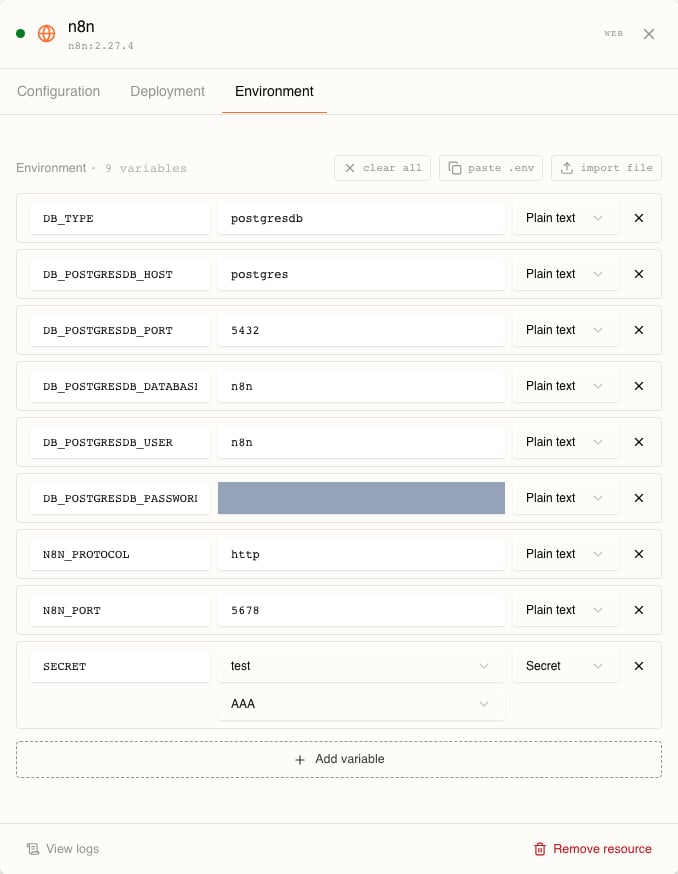
Above the rows sit three shortcuts — clear all, paste .env, import file — and below them Add variable, which appends a blank row set to Plain text.Edits here autosave into a draft. The header reads Saving… then All changes saved, and a pill appears over the canvas reading Apply N changes with Details and Deploy. Saved is not deployed — nothing reaches the cluster until you deploy. See Releases.
The five sources
Open the source dropdown on any row and you get exactly five choices: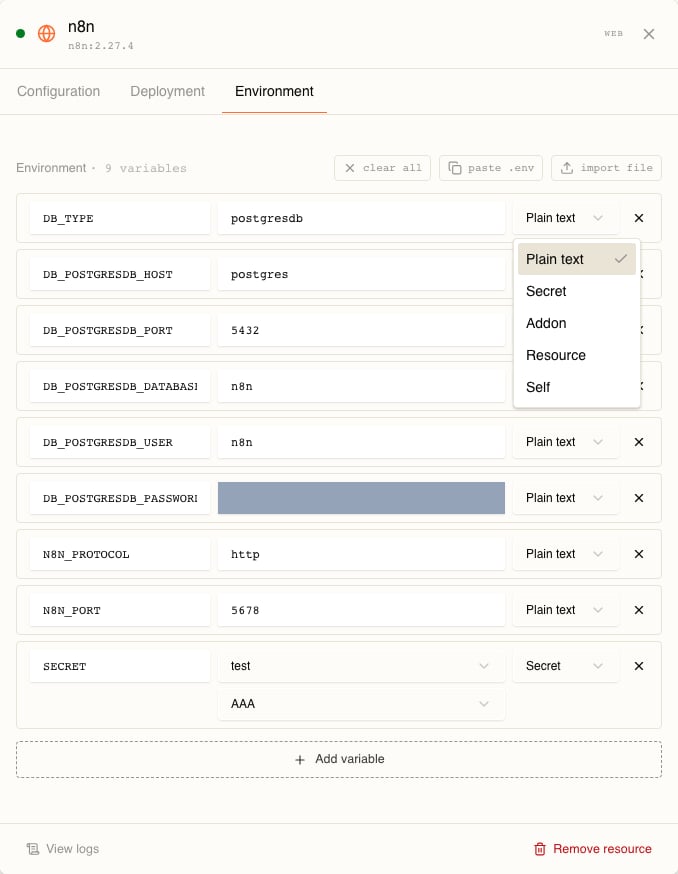
A sixth kind, Template, exists but is not in this list. It appears only on rows that already are one — see Template rows.
They are not stored the same way
Plain text and Self rows are stored as environment variables on the resource itself. Secret, Addon, Resource and Template rows are stored as stack connections — one connection per source, carrying a mapping per variable.You do not have to manage that split, but it leaks into what you can do:The
409 is the part worth remembering. Deleting an organization secret that any stack references fails with secret 'X' is in use by ... and cannot be deleted, and a referenced addon fails the same way. Both the current draft and every past release count as a reference. Retyping a Plain text value, by contrast, is unconstrained — nothing tracks it.Plain text
Choose Add variable, type a name in the key box and a value beside it. That is the whole flow.A plain text value is stored and delivered byte for byte. Nothing is substituted into it.To move a lot of variables at once, use paste .env — a textarea that takesKEY=VALUE, one per line, with # lines ignored — or import file, which accepts a .env upload. Both append Plain text rows. clear all removes every row on the resource, including the pointed-at ones, and does not ask for confirmation.Two rows on the same resource cannot share a name. A repeat is flagged inline as Duplicate name "...".From a Secret
Values you would rather not have sitting in a stack’s spec go in an organization secret first, then get referenced.Create the secret
Open Secrets under PLATFORM in the sidebar, at/secrets. The page is headed Secrets — “Manage sensitive data like API keys, passwords, and certificates” — with Create Secret top right, a Filter secrets… box, a TYPE filter defaulting to ALL, and a SORT control defaulting to RECENTLY CREATED. Existing secrets sit in an ORGANIZATION SECRETS panel, one row each: name, description, type badge, creation date, and a ⋯ menu.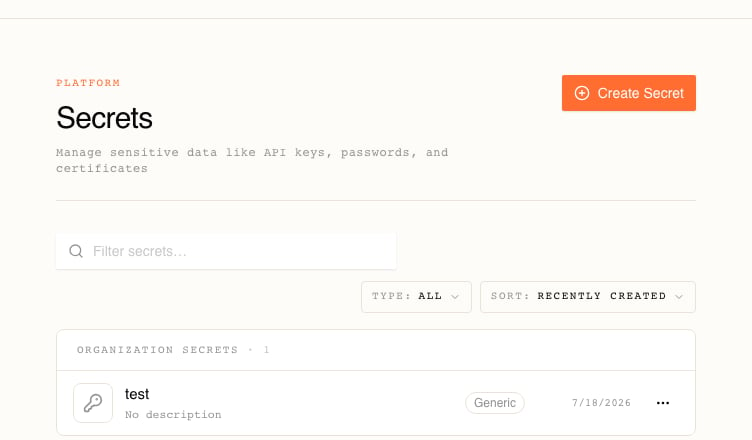
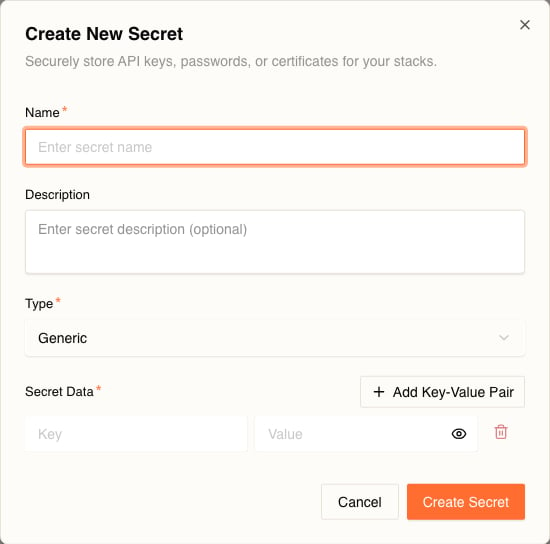
One secret holds many keys, and you reference them one key at a time.
Only Generic secrets can back an environment variable. Docker Registry and Git Credentials secrets exist for pulling images and cloning repositories, and the environment picker filters them out. With no Generic secret in the organization, the picker reads
No generic secrets available.Reference a key
Back on the resource’s Environment tab: add a variable, name it whatever the container expects, and set the source to Secret. The value column becomes two dropdowns — the secret, then the key.SECRET in the first screenshot on this page is exactly that: the secret test, its key AAA.The value itself never comes back to you. Stackdome’s API returns ****** in place of every secret value, so the dashboard has nothing to show and no screen anywhere reveals a stored secret. You can overwrite a value, not read it.Changed secrets need a deploy
Editing a secret does not touch anything already running. During a deploy, Stackdome writes the secret’s current values into the target namespace and points the resource’s container at that key; the container reads it when it starts. So:- Edit the secret. Nothing restarts.
- Deploy the stack. The new value is written and the resource picks it up.
From an Addon
Set a row’s source to Addon and it joins an addon group — a bordered block on the tab labelled Addon, with a dropdown for the addon and, when the addon has more than one database, a dropdown for the database. Rows inside the group share that choice, and Add binding adds another row to it.Each row then picks one field:Like a secret reference, these arrive as a reference to credentials held in the cluster rather than as a value copied into the stack, and they are refreshed on each deploy.An addon has to be linked to the stack before it shows up here; with none linked the picker reads
No addons linked. Add one from the bottom panel.Postgres
Create a managed Postgres addon, add databases to it, and link it to a stack.
From another Resource, or from Self
This is how one resource finds another without you hardcoding a hostname. Set the source to Resource, pick the resource, then pick which of its outputs you want. Self is the same thing pointed at the resource you are editing — pick an output, no resource dropdown.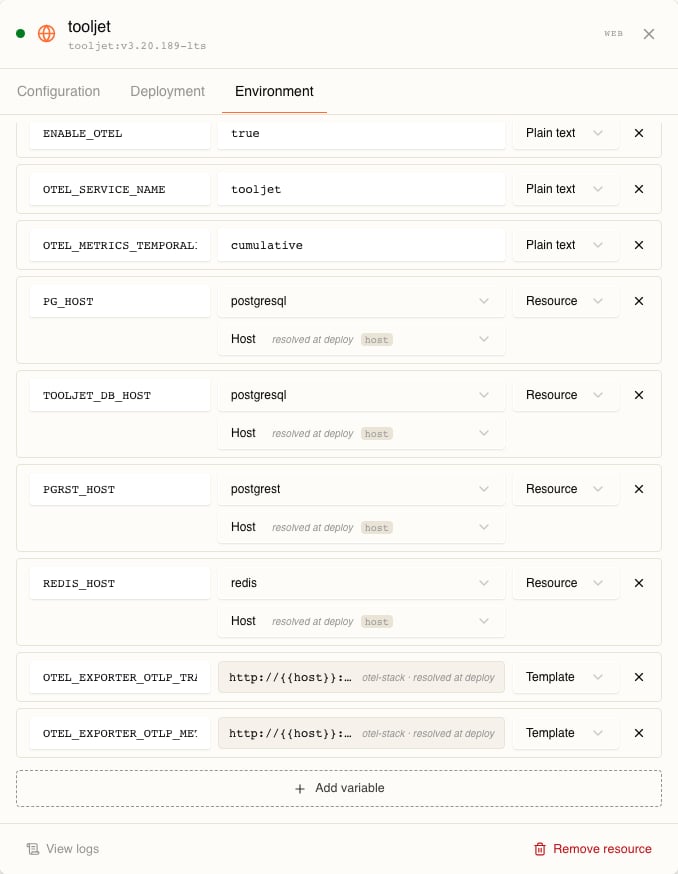
The picker groups them under 🔒 Internal and 🌐 Public, labels them Host, Port, URL, Public Host, Public URL, and prints the raw key beside each along with the words resolved at deploy:
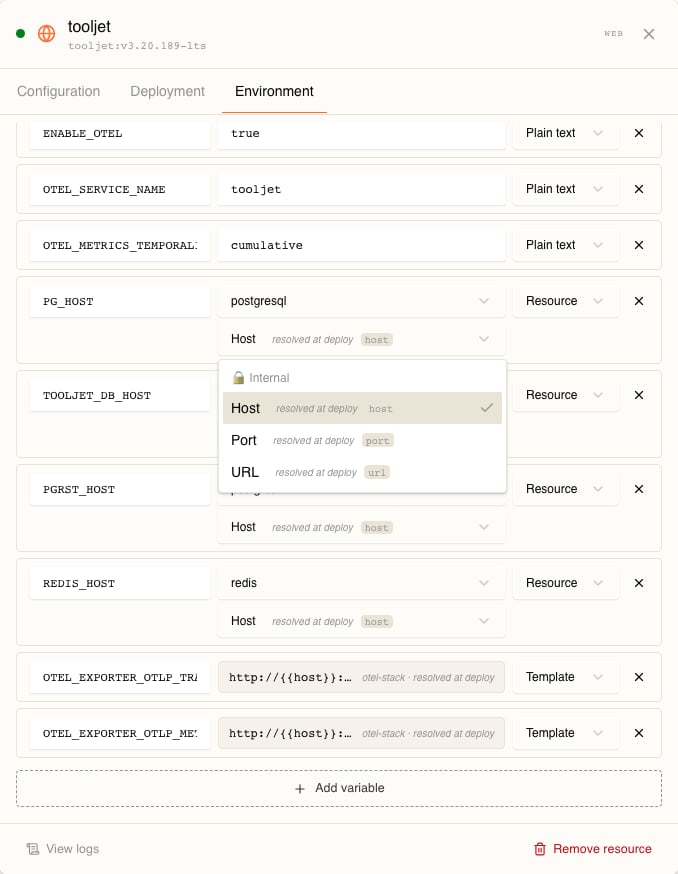
postgresql exposes 5432 internally and nothing publicly.More than one port renames the outputs. With a single port the keys are plain:
port, url. With two or more, each per-port key gains the port’s name as a suffix — port.http, url.http, public_url.http — so there is no ambiguity about which port you meant. host is per-resource and never suffixed.-
PG_HOSTis a Resource row pointing at thepostgresqlresource’shost— visible in both screenshots above. The resource gets the database’s in-cluster address without anyone typing a DNS name. -
TOOLJET_HOSTis a Self row pointing atpublic_url. It sits higher up the same tab, above the rows those screenshots are scrolled to: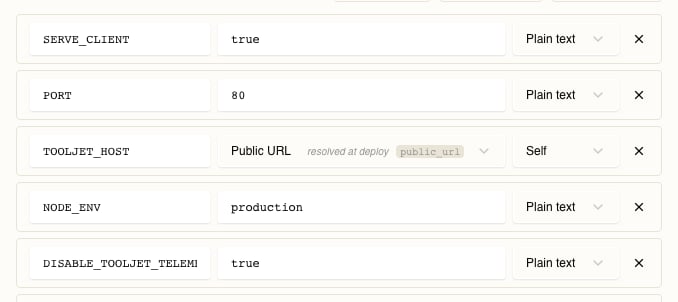
Template rows
A Resource row substitutes one output as the entire value. When a variable needs an output inside a larger string, the underlying connection can carry a Go template instead — a string plus a map from template key to output name:OTEL_EXPORTER_OTLP_TRACES in the screenshot above is exactly this, resolved against the otel-stack resource. Template keys must be valid identifiers — letters, digits and underscores, not starting with a digit.What happens at deploy
Deploying takes a snapshot of the stack and resolves it — that snapshot is what runs, so later edits do not leak into a release in flight. Resolution walks every row:- Plain text — copied through unchanged.
- Self — the output is looked up on the resource itself and becomes a literal value.
- Resource / Template — outputs are looked up on the source resource; a template is executed against them.
- Secret / Addon — the values are written into the stack’s namespace and the variable is pointed at them by name, not copied into the manifest.
An addon whose credentials are not ready yet is not a failure — the release waits and retries.
The messages in this table are read from Stackdome’s resolver, not reproduced by breaking a live stack. Wording may differ slightly by version; the situations are what matter.
Required for a missing name, Duplicate name "...", and Pick a secret, Pick a key, Pick an addon, Pick a database, Pick a field, Pick a resource, Pick an output for a half-finished reference.
Related tasks
Releases
Why a saved change is not a deployed change, and how to read a release.
Postgres
The addon whose credentials the Addon source reads.