Stack
A stack is the unit you deploy. It belongs to your organization, it has a name, and it holds two kinds of thing:- Resources — the workloads that run.
- Volumes — the persistent storage those workloads mount.
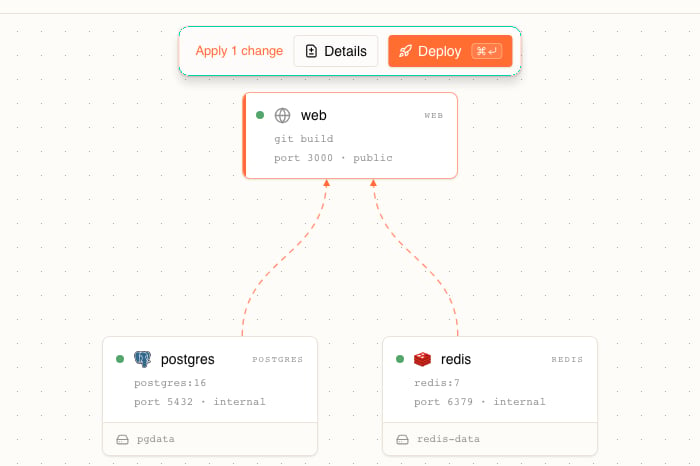
3 resources · 2 volumes. Names must be free: creating a second stack with a name already in use is rejected as a conflict.
A stack is also the boundary around everything inside it. You deploy, inspect, and roll it back as a whole; you do not ship one resource at a time. Stackdome isolates its runtime resources from those of other stacks.
Resource
A resource is one workload inside a stack. An application with a web frontend, a background worker, and a Redis cache is one stack with three resources. Each resource has:- A name, lowercase and unique within the stack.
- Exactly one source — where its container image comes from.
- Zero or more ports.
- Optionally: volume mounts, environment variables, a start command and arguments, an init command that runs before the main one, and a Depends on list of other resources in the same stack that must start first.
source_conflict and the message a resource cannot have both a build source and an image source. Setting neither is rejected too, as source_required. This is why the Build from toggle in the resource drawer replaces one panel with the other instead of showing both: the form remembers whatever you toggled away from so you lose nothing, but only one source is ever sent.
Source
The Build from toggle offers two: Git repository. You pick a repository from a connected provider under Git Providers and a revision — a branch, a tag, or a commit. Stackdome builds the image itself: it clones the repository at that revision, builds theDockerfile (path and build context are adjustable, defaulting to Dockerfile and .), and pushes the result to the deployment destination’s default build registry. Leave Push registry, under Advanced, blank to use that destination, or set it to send the image to a registry of your own. On the canvas a resource built this way reads git build where an image reference would be.
Container image. You give an image reference such as postgres:16 or ghcr.io/acme/api:v2. Stackdome pulls it as-is, with no build step. Public images need nothing else; a private one uses a credential you saved under Image Registries.
In the API each kind is its own key under source, and exactly one key may be set:
Deploy from git
Connect a repository and let Stackdome build the image for you.
Deploy from an image
Run an image you already have, public or private.
Ports
A resource exposes ports by number. You type the number —3000, 5432 — and choose a protocol, http or tcp.
Every port is one of two things:
- Internal. Reachable only by other resources in the same stack. This is the default.
- Public. Stackdome also publishes it at a hostname on your domain, so the port is reachable from the internet. The stack header lists every public endpoint it has.
port-<number> from the number you enter, and re-derives it if you change the number, so port 8080 gets the name port-8080. If you set a name yourself through the API, it must be 1–15 characters of lowercase letters, digits, and hyphens, contain at least one letter, and carry no consecutive or leading or trailing hyphens — anything else comes back as port_name_invalid.
The drawer summarises the section by counting public ports when there are any (1 exposed) and internal ones otherwise (2 internal).
Domains and TLS
Where the hostname for a public port comes from, and how to use your own domain.
Volumes
A volume is persistent storage. It is declared on the stack, not on a resource — which is why a stack card counts volumes separately — and then mounted into one or more resources at a path inside the container. You add one from the canvas, with + Add resource → Volume, and the dialog asks for a name, a size such as1Gi, the resource to attach it to, and the mount path, for example /var/lib/data. A volume then appears as its own node on the canvas, and the resources that mount it list it on their card. Mounts are managed on the canvas, so the Mounts section of the resource drawer shows them read-only.
Volumes and object stores
Sizing, access modes, and when to reach for an object store instead.
Addons
An addon is a managed dependency, run alongside your stacks rather than inside one. Today there is one type: Postgres. You create it on the Addons page, it gets its own namespace, and Stackdome operates it — how many instances it runs, and its backups. Your resources then reference it through their environment. An addon is not the same as a database resource. The + Add resource menu also offers image templates under DATABASES and CACHE, SEARCH & ANALYTICS — Postgres, MySQL, MongoDB, Redis, and others — and those create an ordinary resource from that image inside your stack, which you then run, tune, and back up yourself. Reach for an addon when you want the managed one.Managed PostgreSQL
Provision a managed Postgres addon and connect a resource to it.
The canvas
You edit a stack visually./stacks/new creates one and /stacks/{id} opens an existing one, both on the Architecture tab: resources and volumes are nodes, and the edges between them are the connections that pass values — an environment variable, a volume mount — from one node to another. Drag to rearrange, and click a node to configure it, which opens that resource’s drawer on the right with its Configuration, Deployment, and Environment tabs.
Releases
How a draft becomes a release, and how to roll one back.